Building the Agent, Part Two: A Terminal as a Front Door
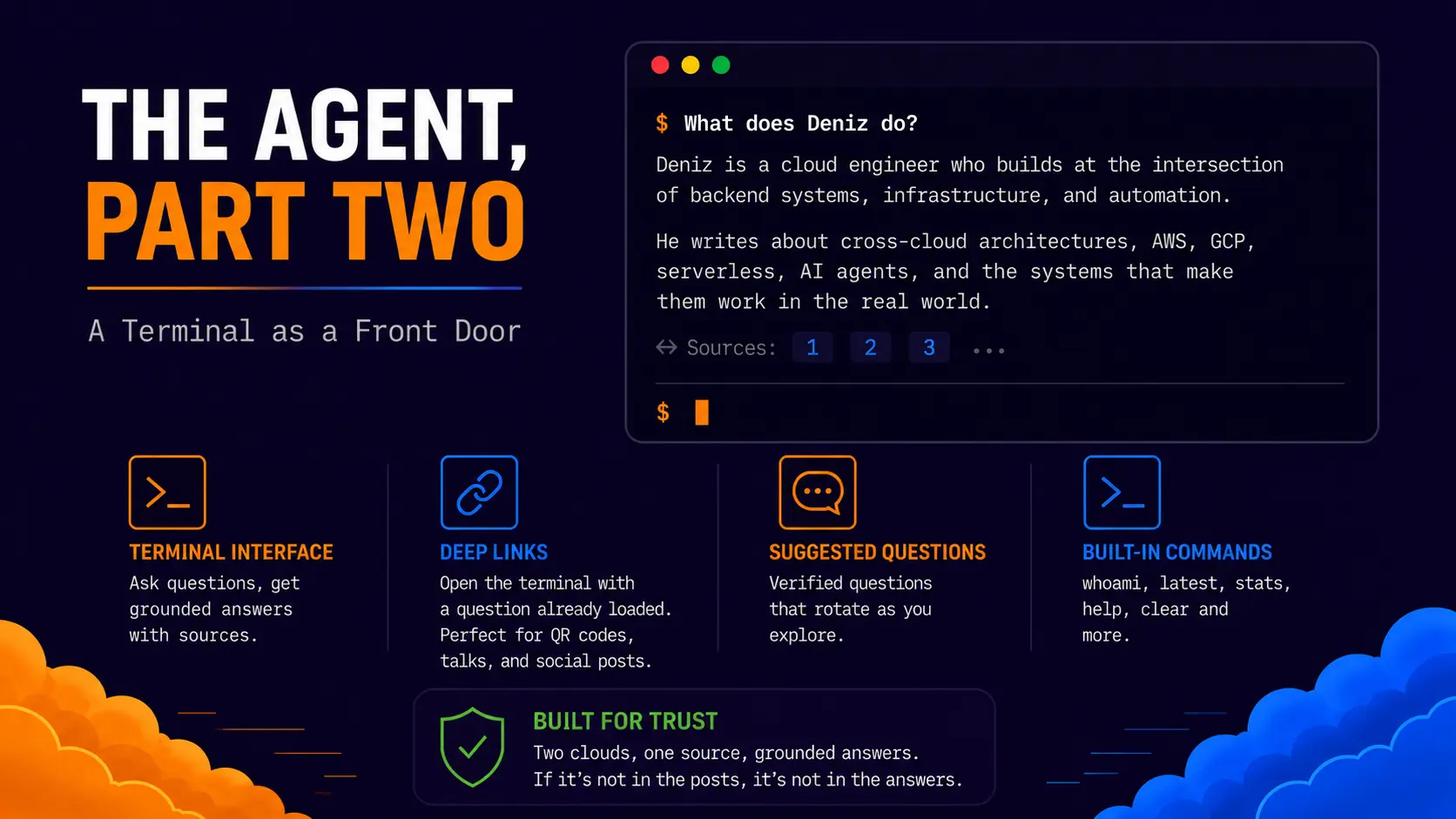
This is part two of the agent build. Part one covers the backend, the Lambda, the keyless cross-cloud auth, and the grounding engine that makes the answers honest. This post covers everything the visitor actually touches. The terminal, the commands, the suggestion system, the deep links, and the three bugs that taught me something on the way.
The short version of the backend for anyone starting here. Questions go to an endpoint, answers come back grounded in my blog posts with citations attached. The frontend treats that as a black box. Everything below is about what happens in the browser.
Why a Terminal
The obvious move was a chat widget. Rounded bubbles, an avatar, a typing indicator, the same interface every AI product ships. I built a terminal instead, and the reasons were practical before they were aesthetic.
A terminal sets expectations correctly. Chat bubbles promise a personality and invite small talk. A prompt and a blinking cursor promise a tool, ask a question, get an answer, sources at the bottom. That matches what the agent actually is, a search engine over my posts with an articulate voice, and an interface that matches the system underneath needs no disclaimer.
It also fits the audience. The people most likely to type into a strange terminal on a personal site are engineers, and engineers are exactly who I want exploring this thing. Everyone else gets suggested questions one tap away, so nobody is locked out by the aesthetic.
Anyways, it photographs well. The thing will end up in screenshots, and a black terminal with a gold cursor is a brand. Bubbles are not.
One Domain, Two Frontends
The terminal lives on denizyilmaz.cloud, which runs two completely different frontends on one domain from one repo. The landing page at the root is a customised HTML5UP Dimension template with particles.js driving the background, serving as the apex card for the whole brand. The journal at /posts/ is a full Jekyll Chirpy site. They coexist because the HTML5UP index.html carries layout: null and permalink: / so Jekyll serves it untouched, with the landing assets isolated under assets/landing/ and the Chirpy feed relocated via paginate_path. The full build of that hybrid, including the empty-feed pagination bug it produced, is documented in Domain Portfolio Architecture. What matters for this post is the consequence, the terminal has to exist on both frontends.
One Terminal, Two Surfaces
The agent appears on both frontends. Inside the About modal on the landing page, and as a dedicated Agent tab on the Chirpy side. Early on these were heading toward two separate implementations with separate styling, and maintaining a conversation UI twice is the kind of decision future me would curse. So both surfaces load the same two files.
1
2
assets/landing/css/terminal.css
assets/landing/js/terminal.js
The Chirpy agent page is a thin markdown file that links the stylesheet, drops in the same terminal HTML as the landing page, and loads the same script. One source of truth, two doors.
Sharing one script across two very different pages creates a targeting problem. The landing page has behaviour the Chirpy side must never run, an exit transition that grabs nav links, which would hijack Chirpy’s sidebar if it fired there. The fix is a fingerprint check. The particles background exists on exactly one page in the world, so the landing-only code wraps itself in a guard.
1
2
3
4
// Landing page only. The exit transition has no business on Chirpy pages.
if (document.getElementById('particles-js')) {
    // nav transition code
}
Cheap, reliable, and it reads as documentation. Any future code that should run on one surface only gets the same treatment.
The Conversation
The mechanics inside the terminal are deliberately plain. Your question echoes back with a $ prefix in white. The answer arrives in grey below it. A Working... line with animated dots fills the wait, which runs three to five seconds since a real retrieval and generation pipeline sits behind it. Citations render as a dim footnote row under each answer, numbered links into the actual posts the answer came from, prefixed with a return arrow.
The input line is pinned to the bottom of the terminal with flexbox, conversation above, prompt at the floor, the way a real shell works. The caret is gold and starts blinking the moment you arrive, which took more effort than it sounds and appears in the bugs section.
Two behaviours are invisible until you trip them. The terminal holds a session, so follow-up questions work, ask about training and then ask “how did he progress” and the pronoun resolves. However, the session only exists after the first answer, which produced a hard rule for the suggestion buttons covered below. And everything the model returns renders as plain text, deliberately. The backend instructs the model to write in plain sentences because this terminal has no markdown renderer, and teaching the model the output medium beat teaching the terminal to render markup.
Suggested Questions
Under the terminal sit three clickable question chips, and the system behind them carries more doctrine than any other frontend feature.
Every question in the pool is verified. Before a question earns a slot it gets tested against the live endpoint, because a suggested question that returns a refusal is a broken button I built myself. The pool currently holds twelve, all tested, all phrased with my name rather than a pronoun. That last part is the cold session rule. Suggestion buttons fire on fresh sessions where a pronoun has nothing to resolve against, “what does he do” refuses on a cold session while “what does Deniz do” answers every time, so the name is mandatory.
The first slot is fixed. It always shows “What has Deniz been building lately?”, because that answer rewrites itself every time I publish, the most prominent button on the page can never go stale. The other two slots draw at random from the pool on every load.
Clicking a chip retires it. The question fires into the terminal, the clicked chip leaves for the rest of the session, and a fresh question from the pool takes its slot, never duplicating anything already shown or already asked. A curious visitor can click through all twelve one chip at a time while the menu regenerates underneath them. New chips fade in over a quarter second rather than snapping into place, a transition cannot animate an element that did not exist a frame ago, so it runs as a keyframe animation on entry.
The Commands
The terminal takes commands as well as questions, and this section doubles as the reference card.
| Command | What it does |
|---|---|
whoami | Explains what the agent is in plain language |
latest | Lists the five newest posts as links |
stats | Site numbers, posts, categories, words, reading hours |
help | Lists everything, plus topics worth asking about |
clear | Wipes the terminal and starts a fresh session |
The commands resolve in the browser before any question would reach the backend, so they cost nothing and respond instantly. The interesting engineering hides in two of them.
whoami is the architecture explained for civilians. It prints four lines, the version, then this.
1
2
3
4
Every question you ask travels through two clouds. Amazon receives it, Google answers it.
Gemini, Google's AI, reads through everything Deniz has ever posted and presents what
it finds, like a presenter working from one source.
If he hasn't written it, I don't know it. Ask me anything.
Every word is technically accurate. The presenter line carries the whole grounding concept without a single term of jargon, a presenter does not invent material, they present what is in front of them, and the source is me. Engineers who type it read “two clouds, single source” and recognise a cross-cloud grounded system described in plain English, which lands harder than the jargon would.
latest and stats are the best technical trick on the page. The terminal is static JavaScript with no API for site data, yet both commands print live numbers. The answer is that Jekyll computes everything at build time and injects it into the page as a global, Liquid writing JavaScript.
1
2
3
4
5
6
7
8
9
10
11
12
13
14
<script>
window.SITE_DATA = {
    recentPosts: [
        {% for post in site.posts limit:5 %}
        { title: {{ post.title | jsonify }}, url: {{ post.url | jsonify }} }{% unless forloop.last %},{% endunless %}
        {% endfor %}
    ],
    totalPosts: {{ site.posts | size }},
    totalCategories: {{ site.categories | size }},
    totalWords: {% assign words = 0 %}{% for post in site.posts %}{% assign w = post.content | number_of_words %}{% assign words = words | plus: w %}{% endfor %}{{ words }},
    writingSince: {{ site.posts.last.date | date: "%b %Y" | jsonify }},
    lastUpdated: {{ site.posts.first.date | date: "%-d %b %Y" | jsonify }}
};
</script>
The word count loop walks every post on every build and sums them, which the stats command turns into the line that reframes the whole site, total words and roughly how many hours of reading that is. Every publish refreshes all of it with zero maintenance. The same block sits in both the agent page and the landing index.html, which Jekyll processes too thanks to its front matter.
The terminal advertises its commands in the welcome lines, so they are discoverable rather than secret. The one genuinely hidden behaviour is the deep link below.
Deep Links
A question can ride in on the URL. Append ?q= and the terminal fires it automatically on arrival, exactly as if the visitor had typed it.
1
denizyilmaz.cloud/agent/?q=What does Deniz do?
Opening that link shows the question already asked and the answer already arriving, a conversation in progress with the cursor waiting for a follow-up. The reason this exists is the card moment. A QR code pointing at a deep link means the scan itself starts the conversation, and the person watches the agent introduce me before they have touched the keyboard. A conversation in motion invites a follow-up far more strongly than a blank prompt invites a first question. Different links can carry different openers for different audiences, the question lives in the URL and I maintain nothing.
The arrival logic handles both surfaces and both cases. With a deep link the question fires. Without one, the input gets focused so the cursor blinks immediately. On the landing page both wait for the About modal to open rather than running against a hidden terminal.
1
2
3
4
5
6
7
8
9
10
11
12
13
const params = new URLSearchParams(window.location.search);
const deepQ = params.get('q');

const arrive = function() {
    if (deepQ && deepQ.trim()) {
        processCommand(deepQ.trim().slice(0, MAX_QUESTION_LENGTH));
    } else {
        setTimeout(function() {
            const input = document.getElementById('terminal-input');
            if (input) input.focus();
        }, 450);
    }
};
That 450 millisecond delay is a bug fix wearing a number, explained below.
The Exit Transition
One piece of polish lives outside the terminal. The landing page nav has four buttons, About opens the modal with Dimension’s native effect where the page falls back as the article rises. The other three leave the site, and a hard cut from that cinematic landing page to a normal navigation felt wrong. So outbound clicks borrow the same motion. The header and footer blur, scale down, and fade over a third of a second, then the browser leaves.
1
2
3
4
5
6
body.is-leaving #header,
body.is-leaving #footer {
    filter: blur(0.1rem);
    transform: scale(0.95);
    opacity: 0;
}
The JS intercepts the click, adds the class, and navigates after 350 milliseconds, matching Dimension’s own 0.325 second timing. New-tab links get a dip-and-restore instead since the browser switches focus instantly and a one-way fade would leave a ghost page behind.
Three Bugs Worth Keeping
The bugs taught more than the features, so they stay in the record.
CSS in a JavaScript file. Early in the build I pasted a CSS block into the end of main.js, and the console filled with errors because a JS engine reads body.is-leaving #header as broken code. Obvious in hindsight, worth writing down anyway. Selectors and braces belong in .css files, functions and statements in .js files, and the error messages when you mix them point everywhere except at the real mistake.
The blank page behind the back button. After the exit transition shipped, clicking an outbound link and then pressing back returned a blank page with only the particles visible. The cause is the back-forward cache. Browsers restore the page frozen exactly as it was the instant you left, and the instant you left, the body carried the is-leaving class with the header at opacity zero. Returning visitors got a snapshot of the departure animation’s final frame. The fix is one listener, pageshow fires on cache restores as well as fresh loads, and it strips the class. The accidental bonus is that returning visitors now watch the header fade back in, which looks designed.
1
2
3
window.addEventListener('pageshow', function() {
    document.body.classList.remove('is-leaving');
});
Focusing an invisible input. The cursor was supposed to blink the moment the About modal opened, and it refused to. The hash changes instantly when you click About, the focus call ran instantly, and Dimension reveals the modal over a 325 millisecond animation. Focusing an element that is still hidden gets silently ignored by the browser, so by the time the terminal was visible the focus had already happened and bounced off. The fix is patience, a 450 millisecond delay that waits out the reveal. Silent failures around visibility and focus are a recurring browser theme, and this one cost an embarrassing amount of squinting at code that was provably running.
The Result
A visitor arriving at denizyilmaz.cloud gets a black landing page with gold particles, clicks About, and meets a terminal with a blinking cursor and three questions ready to tap. A visitor browsing the journal finds the same terminal on its own tab. Both run the same two files, talk to the same backend, hold the same sessions, and know the site’s own numbers without an API. A QR code can open either one mid-conversation.
Part one built a system that only says what I have written. This half makes sure that when someone asks, the asking feels good. The agent thinks on two clouds and greets you through one prompt.