Kapıkırı: Making My First Cinematic Film
Turning a day in a Turkish village into my first cinematic film. Written as I made it, not after.
The Material
Introduction
I shot Kapıkırı in March. It is now July.
I did start editing. Put most of the clips on a timeline not long after the trip, in no real order, and then got stuck because I could not find a song. Finding one was challenging because I did not know what the film was meant to feel like yet. Anything off YouTube risks a copyright claim and the free tracks that are clear to use are usually rubbish, so the search kept coming back empty and the project stalled.
This post documents the whole thing, from the first clip on a timeline to the export. Same approach as the shooting post, written in the order I learned things rather than the order a tutorial would teach them.
What this post is
A learning journal for making my first cinematic film, written during the process rather than after it. Some of the decisions here turned out to be wrong and I have left them in, including the stock clip I bought, fought for three sessions and then deleted. The film is finished now. This is everything it took.
The Footage
Kapıkırı Köyü sits on the shore of Lake Bafa in the Milas borough, inside the national park of Menteşe and the Beşparmak mountains. It is home to the ancient city of Herakleia. Circular fishing is common there, a weighted net thrown by hand so it opens into a ring before it sinks.
I went because of two conversations. My barber told me about Lake Bafa, Bafa Gölü. Then a couple of days later, during a random conversation with a man in Kahve Dünyası, I mentioned I was thinking of going and he told me to go to the village of Kapıkırı. That was the entire reason. I felt spontaneous that day, so I went home, had breakfast, packed a lunch, and hit the road.
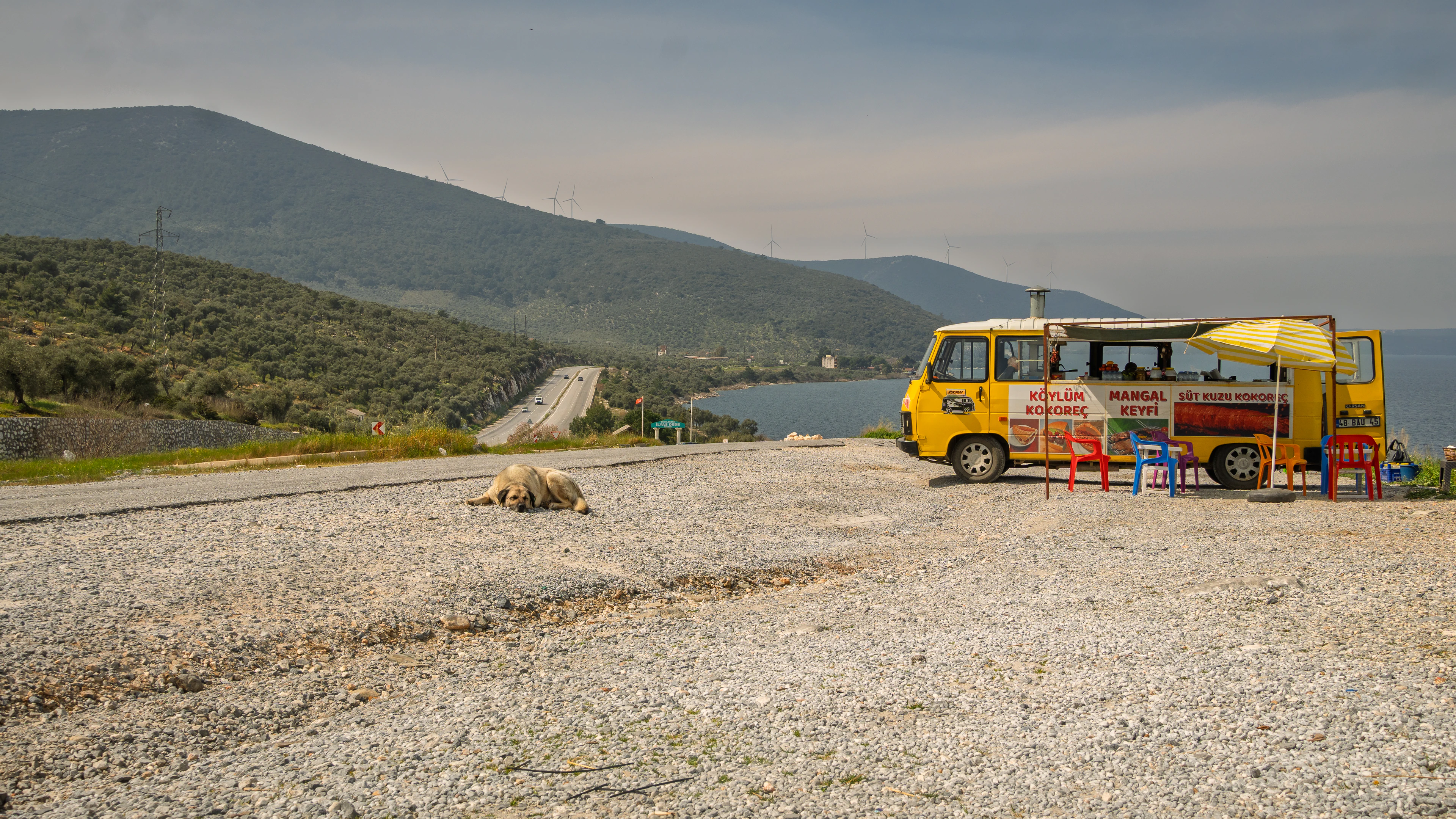
The drive was an hour and a half through farms and mountain roads. On the way I stopped at a food truck by the roadside, Turkish food, the man inside listening to music with a dog lying on the floor outside. Further down there was a handwritten sign, taze çilek, a strawberry stall with mountains and sea behind it. Neither stop was planned. Only the food truck made the timeline, because the strawberry stall was too similar a shot to sit next to it.
The village gave me more in one day than anywhere else on the trip. Chickens roaming, cows in the streets, laundry on a line moving in the wind with the mountains behind it. A kid herding cows up a hill with a stick. An old woman selling bracelets who I bought from just to talk to her. The ezan, the call to prayer, carrying across the village while I sat on the rocks above it, alone, having climbed past where the tourists go. A swim in the coldest water of the trip. A dog stealing my slipper while I was in the lake and running off down the beach with it, which the camera missed but the audio caught, including me laughing.
Then twenty minutes after the sun dropped the sky went pink. Boats on the water, castle ruins in the background. That was the shot of the day and it was not the sunset.
The Song
Everything I tried sat on top of the footage without doing anything to it, and I went months without a track.
Then I was watching a random film on YouTube from another filmmaker and the song in it hit me. Clever Ghost Music, “No Turning Back Now.” I put it under my clips and the thing worked immediately.
The track has a nostalgic sadness to it, and against village footage that is mostly warm and alive, the contrast does something I did not plan and could not have engineered.
I showed that rough assembly to a girl in Turkey. Put the kettle on, came back, and she was crying. That was the reminder I needed. I had delayed far too long, I now had the song, and there was no reason left not to finish it.
The Plan
Deciding the Length
The song runs to 3:44 with the music stopping at 3:41. My first instinct was to ask whether I should extend it somehow, loop it, duplicate a section, to give myself more room.
Wrong question. The song is the film length.
A song already has an emotional structure. Quiet intro, build, peak, resolution. If the edit follows that structure, the film inherits the arc for free. That is exactly why the rough cut worked. The footage sat on top of the song’s shape and the two multiplied.
Loop the song and you ask that arc to happen twice, which flattens it. Listeners hear the seam even when they cannot name it.
So the length is what the file gives me, or slightly less. If I run short on strong clips I trim the song at a bar line rather than looping it. Shortening is invisible. Looping is obvious. (This was true until the ezan went in later and added time that is not part of the song at all. More on that further down.)
Structure
The first practical step was getting the song onto the timeline, locking the audio track so I could not move it by accident, and marking it up.
I played it through watching the waveform and dropped a marker (M) at every point where the track shifts. Five markers.
The markers are not sync points. This confused me at first. With five markers I do not line up five clips. Each marker is a section boundary, and each section holds several clips. The only thing that syncs precisely to a marker is the first clip of the new section, so the visual change and the musical change happen at the same time.
Hard hit on the marker, free rhythm in between.
Chronological or musical?
Musical. Chronological is a slideshow. The strongest emotional footage goes at the song’s peak regardless of when it was shot.
However, the location threading I stumbled into on the shooting side still applies. Within each section, shots that are geographically connected sit next to each other so the viewer moves through a place rather than jumping around it. Arrive from above, come down the road, enter the village, move through it, end at the lake.
Emotional arc decides section order. Geography decides order within sections.
Reading the song with ffmpeg
I placed my markers by ear and was not confident about them. The track is instrumental, no vocals, just a beat, which means there is no separate vocal layer to listen for. The arrangement and the volume are the same thing. So the levels should tell me the structure.
I opened a terminal. I spend my working days in one on cloud infrastructure and none of that was meant to have anything to do with cutting video. The song was just a file with numbers in it, and pulling those numbers out was the most fun I had in the whole edit.
First, how long the song actually is:
1
ffprobe -v error -show_entries format=duration -of default=noprint_wrappers=1 song.mp3
1
duration=224.725333
Then where it stops:
1
ffmpeg -i song.mp3 -af silencedetect=n=-50dB:d=0.5 -f null - 2>&1 | grep silence_
1
2
silence_start: 221.109542
silence_end: 224.725333 | silence_duration: 3.615792
The file is 3:44 but the music stops at 3:41. The last 3.6 seconds are silence, already in the file.
Then the shape. This loops through the track in five second blocks and prints the perceptual loudness of each:
1
for i in $(seq 0 5 220); do v=$(ffmpeg -ss $i -t 5 -i song.mp3 -af ebur128=framelog=quiet -f null - 2>&1 | grep -A1 "Integrated" | grep "I:" | awk '{print $2}'); echo "$i $v"; done
Output is one line per five seconds. Plotted out, the track does this:
| Time | Level | What is happening |
|---|---|---|
| 0:00 to 0:40 | -20 to -18 | Flat and quiet. Slow drift upward. |
| 0:45 to 1:05 | -16.7 to -13.8 | First real lift, nearly 7dB |
| 1:10 to 1:35 | -17 to -15 | Pulls back |
| 1:35 to 1:45 | -18.9 to -18.3 | Quietest point since the intro. A genuine dip. |
| 1:50 to 2:20 | -17.4 to -14.3 | Second build, steady climb |
| 2:25 to 3:35 | -11.8 to -12.2 | Plateau. Loudest passage, 70 seconds, almost no variation. |
| 3:35 to 3:41 | -12.9 | Slight step down, then stops dead |
I ran the same thing with volumedetect for raw mean volume as a cross check and the two curves matched, so the reading is solid.
What that gives me
| # | Section | In | Out | Length |
|---|---|---|---|---|
| 1 | Intro | 0:00 | 0:45 | 45s |
| 2 | First lift | 0:45 | 1:35 | 50s |
| 3 | The dip | 1:35 | 1:50 | 15s |
| 4 | Second build | 1:50 | 2:25 | 35s |
| 5 | Plateau to stop | 2:25 | 3:41 | 76s |
Five sections, which matches the five markers I had placed by ear. The structure was right. The frames were one to two seconds off, every time, because I had been listening for the beat and a five second average cannot resolve that. So the analysis confirmed the shape and my ear placed the cuts. Neither one on its own was enough.
Two findings I did not expect.
- The dip at 1:35. Fifteen seconds where the track pulls back to near intro levels, right in the middle of the film. That is where the ezan goes. Duck the music or let the ambient audio carry it alone and the film gets a quiet centre that makes everything after it hit harder. I would not have found that by feel.
- There is no come down. I had planned six sections ending with a wind down and an outro. The track does not do that. It climbs to a plateau at 2:25 and stays flat for 76 seconds until it stops dead. Seventy six seconds at a constant level is a long time to hold a viewer with no help from the music, so the pacing has to carry it. Shot variety, changes of rhythm, and the strongest material spread across it rather than clustered at one point.
Deciding the Ending
The song does not resolve. It stays on the plateau and stops dead at 3:41. My strongest footage, the pink afterglow, is quiet and reflective, and there is no wind down in the track to meet it halfway.
The silencedetect output solved it. The music stops at 3:41 and the file runs to 3:44, so there are already 3.6 seconds of silence sitting at the end. I do not have to construct anything.
So the ending is the afterglow in silence after the music stops. The sudden stop becomes punctuation rather than an ending, and the emotional response happens in the quiet. The afterglow gets to be the last thing on screen with nothing competing for it.
I did it that way and never changed it. What it became once cut is further down, under The Ending.
The Drone Detour
The Drone Opening (That I Ended Up Cutting)
I do not have aerial footage of Lake Bafa. I wanted it. An establishing shot from above gives the viewer the whole geography, the lake, the mountains, the village at the base, and my ground footage cannot show any of that. Wide to intimate is one of the oldest openings there is.
So I went to Adobe Stock. This section is the story of buying a clip, spending two sessions fighting it, and cutting it anyway.
What to look for
My sequence is 3840x2160, 25p, S-Cinetone, Rec709. Everything coming in has to conform.
| Spec | Requirement |
|---|---|
| Frame rate | 25p ideal. 50p acceptable, divides cleanly. 24p acceptable. Avoid 29.97 and 60. |
| Resolution | 3840x2160 minimum. Higher gives room to reframe. |
| Codec | ProRes if offered, otherwise highest available bitrate. |
| Colour | Rec709. Most stock aerials arrive graded and more saturated than Cinetone. |
Search terms that worked: Lake Bafa aerial, Bafa Gölü drone, Beşparmak mountains aerial, Milas Turkey drone.
The clip
3840x2160, MOV, h264, 70Mbps, 26 seconds, 50fps. Eight credits, same price for HD and 4K, so 4K.
The description mentioned a winding coastal road tracing the shoreline. That is what sold it, because my second shot is the food truck with the dog, and in that clip you see road and water at ground level. Road on the left in the aerial. Road on the left in the food truck shot. A match cut that does the descent for me.
The Frame Rate Problem
I spent an hour on three seconds of drone footage.
The aerial rises as it goes. Starts level, then climbs. That works against me, because rising away from the ground and then cutting to the ground is a contradiction in movement. The viewer feels it as a stumble even if they cannot say why.
First fix was reversing the clip so it descends into my ground shot. Cars started driving backwards, which is the one thing viewers always catch. Reverse was out.
That leaves the section before the rise starts, which is the first three seconds. Too short for an opening establishing shot. So slow it down. The clip is 50fps in a 25fps timeline, so halving the speed gives me six seconds.
There are two ways to halve the speed and they are not equivalent.
| Method | What happens to the frames | Result |
|---|---|---|
| Speed/Duration 50%, Frame Sampling | Existing frames repeat | Judder |
| Speed/Duration 50%, Optical Flow | In-between frames invented that never existed | Smearing on moving subjects |
| Interpret Footage at 25fps | Every 50fps source frame becomes a real frame | Clean |
Interpret Footage is the one I used. Four steps.
- Select the clip in the Project panel
- Right-click, Modify, Interpret Footage
- Set
Assume this frame rateto 25 - Drag to the timeline
Do it in the Project panel before dragging to the timeline. Clips already cut into a sequence do not always pick up the change.
26 seconds became 52. It worked.
Except it did not look right
Exported it and the cars going down the road looked stepped. My first assumption was that I had misconfigured something, because I am new to this and that is usually the answer.
The test is stepping through frame by frame with the arrow keys on a section with moving cars. Every press should move the car. Mine were holding position across two presses.
So I ruled things out. Speed/Duration on the timeline clip read 100%. Dragged a fresh copy in case the timeline clip predated the interpret. Checked the sequence timebase in case it was 50, which would make each arrow press half a frame. It was 25.00, 3840x2160, progressive.
Sequence right. Interpret right. Speed right. That leaves the file.
Proving it
Back to the terminal. ffmpeg answers this in two commands. First, what the file claims to be:
1
ffprobe -v error -select_streams v:0 -show_entries stream=r_frame_rate,avg_frame_rate,nb_frames,duration -of default=noprint_wrappers=1 ~/Downloads/AdobeStock_1735373388.mov
1
2
3
4
r_frame_rate=50/1
avg_frame_rate=50/1
duration=26.000000
nb_frames=1300
Clean. Exactly as advertised. Then, whether those frames are actually different from each other:
1
ffmpeg -i ~/Downloads/AdobeStock_1735373388.mov -vf mpdecimate -loglevel debug -f null - 2>&1 | grep -c "drop_count:[1-9]"
1
520
520 duplicate frames out of 1300. Around 40%.
I ran the same test on the watermarked preview I had been cutting with before I paid and got 518 out of the same 1300. Effectively identical, the two-frame gap being compression noise at different bitrates.
What that means
The duplicates are in the original source. Not the 4K encode, not the preview encode, nothing to do with Premiere. 40% is not the clean 50% you would get from simple frame doubling, so it is probably not a straight 25 to 50 conform. More likely the drone dropped frames during recording and the encoder filled the gaps. No way to know from outside the file.
No amount of correct settings fixes duplicated frames that were baked in before I bought it. The slowdown plan died. I used it at native 50fps instead, which plays at normal speed in a 25p timeline and discards every other frame. Since 40% of those were duplicates anyway, very little real detail is lost.
Two things I take from this. The frame rate in a stock listing tells you what container the file is in, not whether the frames inside are real. And the preview test works, 518 against 520 proves the watermarked version accurately represents what you are buying. Download the preview, run mpdecimate, and if duplicates come back above roughly 5% do not buy it if you intend to slow it down.
The other thing, and this is the useful bit. I saw the stutter before I could prove it, and the temptation was to assume I had done something wrong. Trusting the observation and testing it properly instead of accepting the stutter as normal is the thing to repeat.
And then I cut it
Weeks later, grading, I could not make the stock aerial sit with my footage. It was shot on a bright clear day with vivid blue water. Mine was an overcast grey day. I pulled saturation down to 70, warmed it, pushed the midtones away from blue with the colour wheel. It got closer. It never got there, because those are different weather conditions and no grade reconciles that.
Then the obvious thing occurred to me. It was the only borrowed footage in an otherwise entirely personal film. Everything after it was mine, one camera, one afternoon, one consistent look. I was spending my third session trying to make someone else’s sunny drone shot belong in my grey village.
So I cut it. The film now opens on the food truck, a yellow van by the road with a dog asleep beside it and the mountains behind. It loses the establishing geography and gains total coherence. It also starts in my world immediately, at ground level, which is where the whole film lives anyway.
Eight credits, three sessions, and the right answer was to delete it. I would still buy it again, because I would not have known otherwise.
The Assembly
The Intro
Nine shots, 0:00 to 0:45. This is the version after the stock aerial came out.
- Food truck wide, 18mm, with the dog, title overlay, 6s
- Food truck tight, 5s
- Dog tight, road behind, 4s
- Truck passing on the road, Latmos behind, 5s
- Grandmothers setting up their stall, wide, car park level, 4s
- Grandmothers tight, 4s
- Tourists arriving by bus, high angle, 4s
- Tourists descending the steps, 5s
- Woman walking alone, dog crosses frame, Latmos behind, 7s
The story is an arrival in three moves. A stop by the road where someone lives and works out here, then travel on. Reach the village and find the grandmothers already set up in an empty car park, they were there first, they do this every day. Then the bus, then the visitors coming down. Finally one woman walking alone with the mountains behind her.
The film narrows from a place to a group to a single person. It also sorts who belongs from who is passing through, without saying so. It mirrors what I actually did that day, climbing past where everyone else stopped, without the film having to state it.
The truck goes wide, tight, then the dog. The dog only appears properly in the wide and the tight dog shot, and nobody notices an absent dog, they notice the frame getting tighter. Same focal length series as the shooting.
The First Lift
Eleven shots, 0:45 to 1:32.
- Woman with a bucket, mountain backdrop, 5s
- Laundry wide, mountains behind, 5s
- Laundry tight, slowed to 25fps, 4s
- House with laundry blowing, 18mm, 4s
- Corner shop front on, bags rustling, 4s
- Castle ruins scattered, 4s
- Chickens tight, running toward camera, 3s
- Chickens wide, a man enters from the left eating an apple, 4s
- Dog playing with a butter container on the gravel, 3s
- Two women up the slope, wide, 3s
- Two women up the slope, tight, 3s
The story is the village awake and going about its day. The intro was outsiders arriving. This is what the place is actually like once you are in it. Nobody performing, nothing dramatic, just ordinary life so the dip and the peak have something to sit against.
Two things build across it. People get closer as it goes, a distant woman with a bucket, then a man mid-frame with an apple, then two women filling the frame on the slope. And the shots shorten from 5 seconds to 3, so the pace tightens into the drop at 1:32. It ends on an upward move, the women climbing, which hands into the quiet.
The laundry tight is the shot I slowed to 25fps and it works here where it did not before. The reason was position, not speed. A slow shot surrounded by faster ones has a different texture, which is the point in a breath shot, but the same shot in a busy run just looked wrong.
The chickens are a small joke. Tight on them running, then wide as a man wanders into frame eating an apple. The wide reveals something the tight one hid, which is why tight-to-wide works here against the usual order.
The Ezan
This is the centre of the film and it is not part of the song at all.
At the top of the rocks above the village, alone, having climbed past where the tourists go, I recorded the ezan echoing across the valley. In the shooting post I called it one of those moments you do not forget. The shot that goes with it is the wide from up there, the minaret on the left, the castle ruins on the right, the whole village between them, the mountains stacked behind, the lake at the edge. The geography of the entire film in one frame, seen from a height I climbed to.
Everything else in the film is cut to a song I found on YouTube. That song could sit under anyone’s footage. The ezan and that view both came from being somewhere other people were not. That is what makes the centre of the film mine rather than borrowed.
The music stops for it. Not ducked, muted. In Islam it is haram to play music during the ezan, so the song fades fully out before it starts. That turned a religious constraint into the right edit anyway, because a full stop is more striking than a quiet music bed, and the song returning afterwards hits harder for having been gone.
The transition uses no constructed fade on the way in. The clip has a couple of seconds of real silence at its head, room tone from that spot, before the recitation begins. So the song fades out under the women climbing, the picture cuts to the wide, and the clip’s own silence does the work before the call rises into it. Real air, not digital silence, no seam.
The visual cuts once, from the wide to a tighter mosque shot, on a natural pause in the recitation. The audio runs unbroken across the cut. Picture changes, sound does not.
Fixing the Wind
The ezan was recorded on the A6700’s built-in mic with no wind protection, and there was wind. Broadband wind, sitting on the same frequencies as the voice, which is the hardest kind to remove because anything that takes out the wind takes out the voice with it.
It took a stack of tools across two apps to get it usable.
In Audition, on the file:
- FFT high-pass cutting everything below 200Hz across the whole clip. The voice’s lowest harmonics sit around 300 to 400Hz, so below 200 is almost pure wind. This did most of the work.
- Captured a Noise Print from the roughly three seconds of wind-only audio at the head, before the recitation starts. This matters, the print has to be wind with no voice in it, or the tool learns the voice as noise and removes it.
- Noise Reduction with that print, two gentle passes at 50% and 8dB rather than one hard pass, which sounds cleaner.
Then in Premiere, on the clip:
- DeNoise at 15%, focused on the lower frequencies, as a light top-up.
- Parametric Equalizer, high-pass on at 200Hz with a steep 48dB slope, plus a small +2dB lift at 3200Hz to bring the voice forward as the low end leaves.
The spectral display in Audition is what made this possible, seeing the wind as a shape at the bottom and the voice as stacked harmonic bands above it, so I knew exactly where to cut.
The real lesson is that wind is a recording problem, not an editing one. No software removes broadband wind cleanly. A furry windshield, a dead cat, over the mic at the time would have prevented the entire hour of work. That is the next gear purchase. Also worth doing at every location, record a few seconds of clean ambient sound on its own, so there is always a noise print to sample from.
The Dip
The song has one quiet passage, around 1:35 to 1:50 by the level analysis. I cut it out of the track and moved it to after the ezan, where it does more good.
So the order through the middle goes like this. First lift over the song, song fades out, ezan over the wide in silence, then that quiet passage fades back in as a recovery beat, then the second build.
Two shots, both still.
- Village wide, minaret, mountain, ground level, 5s
- Empty rock, mountain behind, 4s
No movement in either. The viewer surfaces from the call before anything starts again. The music fades back in underneath with an exponential fade of a second or two, since coming up from true silence needs a ramp or it feels abrupt.
The ground-level village shot right after the ezan turned out to matter more than I expected. It reads as coming back down to earth after recording the call from up on the rocks, a descent in itself.
The empty rock sets up the second build, because the build opens on the same rock with a man on it.
The Second Build
Nine shots. The descent to the water.
- Man by the rock, the reveal after the empty frame, 5s
- Group walking down toward the shore, 4s
- Same group crossing, castle behind, 4s
- The plane, biker jumping out of it, 4s
- Plane rear, biker walking around, 3s
- Plane rear high angle, lake in frame, red car, the dog from earlier, 3s
- Red car reversing, 3s
- Tight on the driver’s face at 135mm, slightly shaky, 2s
- Ten bikers driving off the shore, plane wing, mountains, 5s
The old yellow Turkish Airlines wreck sits on the beach and it is the busiest the film gets. Shot 6 is the pivot, the lake finally comes into frame and the film starts turning toward the water.
The last shot runs five seconds so the whole group clears frame, and it hits the drop into the plateau. The build tops out on the plane and the bikers, then empties as everyone drives away.
The Plateau
Fourteen shots across 76 seconds, the flattest stretch in the music. With no dynamic help from the track, the pacing carries it, so this is the quick section, two to three second cuts on the beat.
It splits by light. Everything bright and daytime goes in the first half, and the moment I cut to the first sunset-lit shot I have committed to evening and cannot cut back to daylight without the brightness jumping.
Daytime
- Kid herding cows up the slope, wide, 4s
- Tighter, he hits one at the back to keep it moving, 4s
- Buying bracelets from the grandmothers, 4s
- Dog cutting across frame, mountains and houses, 4s
- Bikers passing the same stall, grandmothers moved, me gone, 4s
- Man driving, tight, 4s
- Woman walking to a car, 4s
The turn
- Dog looking out at the lake, wide, 4s
- Tighter on the boats, sun going orange behind cloud, 3s
The swim, all one continuous take
- Dive in, sun out of the cloud going red, 3s
- Swimming, sun lower, 3s
- Walking out, sun near the mountain, 3s
- Sun half behind the ridge, me gone from frame, 3s
- Sun disappearing, 3s
The daytime half front-loads the strongest human material because a flat section needs it. Shot 3 pays off the intro, those grandmothers were setting up their stall in the opening. Shot 5 is the same locked frame a minute later with the grandmothers shifted and me gone, which quietly shows time passing at the one spot that stays put while everything moves through it.
The swim is one continuous seven-minute recording cut into moments, so the sun descends through them in real order. Nobody times a sunset, but picking moments from across one long take makes it look composed.
The Ending
Six shots. After the sun is gone, the afterglow.
- Lake, windmill, birds, 4s
- Lake, two boats, windmill on the left, 4s
- Wider, boats drifted, sky darker and more red, 4s
- Windmills tight, still red because it is zoomed in on the lit structure, 4s
- Lake, boats, ruins, sky going blue, hits the last drop of the music, 5s
- Darkest, boats on near-black water, silence, end card, fade to black, 5s
The sky burns red then cools to blue, which is the real order a sunset fades, so the shots run by colour and by the time they were shot.
Shot 5 still has the ruins in it, which ties the castle thread to the final frame. It runs five seconds as the last drop rings out. Then the music is gone and shot 6 runs in pure silence before fading to black.
The music resolves on the second-to-last shot. The silence belongs to the last one. That was the ending I decided on before I had cut a frame of it, and the silencedetect output that found 3.6 seconds of silence already sitting at the end of the song is what told me it would work.
The f/16 Trade
Going through every clip to name it, I ran exiftool on the files to read the aperture each was shot at, because I could not remember exactly. Roughly a third of the footage came back f/16.
That was deliberate. My variable ND shifts colour as you rotate it, and I would rather stop down than put a warm cast on every clip and then fight it in the grade. Going to f/16 let me keep the 25fps and 1/50 shutter in bright light without the filter on at all. The trade is sharpness. Diffraction softens the whole frame on an APS-C sensor past about f/11, and at f/16 it is there across those clips.
I checked it rather than take it on faith. Opened an f/16 clip and an f/8 clip in Premiere at 100%, looked at stone and foliage, and the f/16 was uniformly softer. Not blurred, just less bite everywhere. At three second cuts in a music film nobody watching will notice, but I can see it. Clean colour without the ND cast, against a touch of diffraction softness, and on this trip I took the softness. Knowing what it costs, next time I would rather solve it at the filter.
The exiftool sweep is worth keeping as a habit. One command reads the f-number of every clip in a folder:
1
for f in *.MP4; do echo -n "$f: "; exiftool -ee -FNumber "$f" | sort -u | awk -F: '{print $2}' | tr '\n' ' '; echo; done
The real fix is a better ND, a fixed strength with a magnetic mount so it snaps on and off in a second and does not cast colour. That is the thing that would let me stay at f/8 with clean colour and never have to choose.
The Full Timeline
Fifty-three shots. This is the whole film.
Intro, 0:00 to 0:45, arrival, many to one
| # | File | Shot | Len | f |
|---|---|---|---|---|
| 01 | C1541 | food truck wide, dog, title overlay | 6s | 11 |
| 02 | C1544 | food truck tight | 5s | 10 |
| 03 | C1543 | dog tight, road behind | 4s | 11 |
| 04 | C1550 | road, lorry passing, Latmos | 5s | 16 |
| 05 | C1602 | grandmothers stall, wide | 4s | 16 |
| 06 | C1603 | grandmothers stall, tight | 4s | 16 |
| 07 | C1556 | tourists arriving, high angle | 4s | 16 |
| 08 | C1553 | tourists descending steps | 5s | 16 |
| 09 | C1608 | woman walking, dog crosses, Latmos | 7s | 11 |
First lift, 0:45 to 1:32, village awake, builds and tightens
| # | File | Shot | Len | f |
|---|---|---|---|---|
| 10 | C1557 | laundry wide, minaret, red clothes | 5s | 16 |
| 11 | C1564 | laundry tight, slowmo 50→25 | 5s | 16 |
| 12 | C1600 | house, cola fridge | 4s | 16 |
| 13 | C1598 | shop, Aslan Bakkal | 4s | 14 |
| 14 | C1580 | castle ruins, rocks, lake glimpse | 4s | 8 |
| 15 | C1565 | chickens running, man enters with apple | 4s | 16 |
| 16 | C1566 | chickens scatter, man central | 4s | 16 |
| 17 | C1624 | dog with container | 4s | 8 |
| 18 | C1596 | slope, woman and friend by tractor | 4s | 14 |
| 19 | C1597 | slope, women together, her voice, my giggle, song fades | 4s | 14 |
Ezan, the centre, music muted
| # | File | Shot | Len | f |
|---|---|---|---|---|
| 20 | C1585 | mosque and castle wide, 3s silence then ezan, one unbroken shot | 25s | 8 |
Dip, recovery, music fades back in
| # | File | Shot | Len | f |
|---|---|---|---|---|
| 21 | C1568 | village wide, minaret, ground level | 5s | 8 |
| 22 | C1561 | empty rock, mountain | 4s | 8 |
Second build, descent to the water
| # | File | Shot | Len | f |
|---|---|---|---|---|
| 23 | C1562 | man by the rock, reveal | 5s | 8 |
| 24 | C1572 | group walking down to shore | 4s | 8 |
| 25 | C1575 | group crossing, castle behind | 4s | 16 |
| 26 | C1606 | plane, biker jumps out | 4s | 16 |
| 27 | C1607 | plane rear, biker walking | 3s | 16 |
| 28 | C1618 | plane rear high, lake, red car, dog | 3s | 7.1 |
| 29 | C1621 | red car reversing | 3s | 10 |
| 30 | C1623 | red car driver tight, face | 2s | 5.6 |
| 31 | C1615 | ten bikers driving off, plane wing | 5s | 9 |
Plateau, daytime first, fast cuts, then the turn
| # | File | Shot | Len | f |
|---|---|---|---|---|
| 32 | C1594 | kid herding cows, wide | 4s | 14 |
| 33 | C1595 | kid herding cows, tight, hits one | 4s | 14 |
| 34 | C1605a | buying bracelets, grandmothers payoff | 4s | 16 |
| 35 | C1609 | dog crossing, mountains, houses | 4s | 11 |
| 36 | C1605b | bikers passing stall, grandmothers moved | 4s | 16 |
| 37 | C1573 | man driving, tight | 4s | 16 |
| 38 | C1574 | woman walking to car | 4s | 16 |
| 39 | C1613 | dog looking at boats, wide | 4s | 11 |
| 40 | C1612 | boats, sun behind cloud, light turns | 3s | 8 |
| 41-45 | C1633 | the swim: dive in, swimming, walking out, sun half under, sun gone | 3s ea | 11 |
Ending, afterglow, red to blue to black, in silence
| # | File | Shot | Len | f |
|---|---|---|---|---|
| 46 | C1634 | lake, windmill, birds | 4s | 11 |
| 47 | C1636 | lake, two boats, windmill | 4s | 8 |
| 48 | C1637 | lake, boats, wider, darker red | 4s | 7.1 |
| 49 | C1642 | windmills tight, red | 4s | 5.6 |
| 50 | C1639 | lake, boats, ruins, blue, hits final drop | 5s | 5.6 |
| 51 | C1645 | darkest, boats on dark water, silence, end card, fade to black | 5s+ | 5.6 |
Sound through the film: song plays intro and first lift, fades out under shot 19 with her voice and my giggle, silence, ezan over shot 20 on its own unbroken audio track, the cut-out quiet passage of the song fades back in for the dip, second build and plateau, music resolves on shot 50, shot 51 in silence to black.
The Finish
Colour Grading, First Time
The edit and sound were locked. Then the part I had never done.
Grading is two jobs and conflating them is why it feels overwhelming. Correction makes every clip consistent and neutral. The look is the creative colour you push across the whole film once it is consistent. Do them in that order, never start with the look.
Reading the scopes
The tool that made this possible was the Lumetri Scopes panel, specifically the RGB Parade. It splits the image into red, green and blue channels side by side. If the tops of the three channels sit at the same height, your whites are neutral. If one sits higher, that is your cast.
The waveform next to it shows brightness from 0 at the bottom to 100 at the top. A clip using the full range looks right. A clip compressed into the middle looks flat and dull, which is what Cinetone gives you out of camera.
So the correction recipe for most clips was two moves. Fill the range with Whites up and Blacks down until the waveform reaches 0 and 100 without crushing or clipping. Then level the parade with Temperature until the three channel tops match.
What I learned about my own footage
Almost every village clip needed +10 temperature. Overcast Cinetone on the A6700 runs cool by roughly that amount. That was worth discovering, because next time I can set a warmer white balance in camera and skip the pass entirely.
The other consistent thing was blue shadows. On nearly every clip, red and green dropped to 0 at the bottom of the parade while blue stopped around 5 to 10. Slightly blue darks. I left it, since it reads as filmic and correcting it 53 times would have been madness. That is what the look pass is for.
The things that caught me out
- Pasting attributes is not a shortcut past thinking. A wide and a tight of the same subject seconds apart have different content distributions, so blacks that suit one crush the other. Paste the tonal base, then check every parade.
- Auto is not your friend. I tried it on one clip and it applied saturation 128, whites -25, highlights -31 and negative contrast. It looked vivid, which is seductive. But auto analyses each clip in isolation with no idea what comes before or after, so across 53 clips the colour intensity would pulse. The vivid quality it produced was real feedback though, my corrected footage was flat and wanted lift. I just did it deliberately, once, at the end.
- Match the result, not the settings. Two clips with different content need different numbers to arrive at the same place. Temperature was the one value that stayed consistent because it corrects a cast, and the cast was consistent. Whites, blacks and contrast varied per clip because tonal range is about what is in the frame.
- The white balance eyedropper is a good starting point and a bad master. Clicking a white wall on the grandmothers tight shot gave me -14.1 temperature, which was too cold. I eased it to -8 by eye. It gets you 80% of the way in one click, then your eyes finish the job.
- Real colour is not a cast. A yellow plane pushes red and green up. A red car pushes red. Green foliage pushes green. Neutralising the parade on those clips would drain the actual colour out of the scene. The test is whether things that should be neutral, white walls, grey gravel, a white dog, look neutral.
The sunset is a different job
Everything above is about neutralising. The sunset run is the opposite. The parade on those clips shows red at 100, green at 85, blue at 70, and that gap is the sunset. Level those channels and you delete the light.
So for the swim and afterglow the approach flipped. Do not correct for neutrality. Check nothing is clipping or crushing, then make sure the progression flows, each clip a little darker and a little redder than the one before. They were cut from one continuous take with locked settings, so the descent was already smooth. Mostly they needed nothing.
The look pass
One adjustment layer across the whole timeline, and Vibrance +20 on it. That was the entire look.
I browsed the Lumetri presets, the film stock emulations and Cinespace and the rest. They are built to look impressive on any footage, which means they are strong, and after hours getting 53 clips consistent a heavy preset undoes that in a click. I also considered a gentle S-curve for contrast and then realised I was reaching for it because it is a thing people do, not because the film asked. My watch-through notes said “some clips too blue” and “sunset foregrounds too dark.” Neither is a contrast problem.
The film’s identity comes from the light and the place, not from a stylised grade.
The f/16 clips
Sixteen of the 53 needed the sharpening pass.
- Effect: Effects, Blur & Sharpen, Sharpen
- Amount: 15 to 25
- Judged at: 100% zoom
- Stop before: halos appear on high-contrast edges
- Scope: per clip, never the adjustment layer
Sharpening a clip that is already sharp adds noise and artefacts for no benefit. The point of the pass is to close the gap between the soft clips and the rest, not to move everything.
Titles
Plain text, no template. I looked at what actually reads as cinematic and it is restraint. Templates are designed to look impressive on their own, which fights everything a quiet film is doing.
The typeface is Inter, and it is now the DenMotion typeface for everything. Full Turkish character support, works small, does not date. The dotless ı in Kapıkırı and the ö and ü in Gölü all render properly, which I checked before committing.
- Opening card. Kapıkırı, Bafa Gölü. Location only, Turkish spelling. Overlaid on the first shot rather than on a black card, so the film starts immediately. Upper left, over the pale sky, which was the only quiet area in that frame.
- End card. DENMOTION in caps, with Kapıkırı, Bafa Gölü, March 2026 underneath in sentence case. Overlaid on the final dark shot rather than a separate black card, so the film resolves rather than stopping and having an epilogue.
What I standardised for the brand is typeface, size, tracking and fade timing. What varies per shot is position, because it goes wherever the frame is quietest, and weight, because Light disappeared against the overcast sky and needed to be Medium. Legibility beats consistency.
Two things I got wrong first time. I placed the opening title over bright gravel where white text vanished, and Inter’s default tracking is tight so the title looked cramped until I opened it out by 20 to 40.
No brand mark at the front. A logo before the film delays it, and a solo filmmaker’s mark at the head of a four-minute short reads as eager rather than established. Authorship belongs at the end, when the viewer has watched the thing.
Export
Two exports, one to upload and one to keep.
For YouTube
- Codec: H.264
- Resolution: 3840x2160, 25fps
- Bitrate: VBR 2-pass, 50 Mbps target, 60 max
- Audio: AAC 320kbps
- Also: Maximum Render Quality ticked
YouTube re-encodes everything, so a high-bitrate source means their compression has more to work with.
For the master
- Codec: Apple ProRes 422 HQ
- Wrapper: QuickTime
Visually lossless, large, and the thing I keep. Everything else gets made from it.
Queue both to Media Encoder rather than exporting from Premiere directly, so Premiere stays usable and the jobs run one after another.
Thumbnail
- Source: a photo I took on the day, not a video frame
- Crop: 16:9
- Export: 3840x2160 JPEG, sRGB
Upload it from desktop. Mobile caps thumbnails at 2MB and a 4K JPEG exceeds it.
Archive: File, Project Manager, Collect Files and Copy to New Location, preview files excluded. That gathers the project and every media file actually used. I kept the full card dump separately too, because the clips that did not make this cut are the ones I would want if I ever revisit it.
The Result
The Watch-Through
The last step before export is watching the whole thing start to finish with no scopes, no notes, no stopping. After weeks inside it frame by frame, that was the first time I saw it as a film.
It kept my attention the whole way. That was the main thing.
What it caught that clip-by-clip work never would:
- A batch of village clips had drifted too cool. Grading over multiple sessions, your eye adapts, and I had overcorrected in one direction without noticing.
- The f/16 diffraction was actually visible. I had accepted it in theory. On the car park shots at normal viewing size it showed.
- The intro title was too quick
- The sunset foreground hills were too black
And a man drives past in the third clip and waves at the camera. I had never seen it.
What I Learned
| Lesson | Detail |
|---|---|
| Cut the film to the song | The song’s structure becomes the film’s structure. Do not loop it. |
| Read the song with ffmpeg | Level analysis finds the sections and the quiet points. The ear places the frames. |
| Musical order, not chronological | Emotional arc decides sections. Geography and light decide order inside them. |
| The plateau splits by light | Once you cut to a sunset shot you cannot go back to daytime. |
| A long take makes a composed sunset | One continuous swim, cut into moments, and the sun descends through them. |
| People get closer as a section builds | Distant figure, then mid-frame, then filling the frame. The build is in the framing. |
| Reveal a place empty, then fill it | Empty rock, then a person on it. The cut does something two unrelated shots would not. |
| Interpret Footage, not Speed/Duration | Real frames at half speed beats repeated or generated ones. |
| Stock frame rate is a container spec | 50fps in the listing does not mean 1300 unique frames. Test the preview. |
| Borrowed footage rarely belongs | Different day, different weather, no grade reconciles it. I cut the clip I paid for. |
| Read the aperture, do not trust memory | exiftool reads the real f-number per clip. I was wrong about half of them. |
| f/16 is a trade, not free | Avoiding the ND cast costs diffraction softness. A fixed ND fixes both. |
| Wind is a recording problem | No software removes broadband wind cleanly. A dead cat on the mic prevents it. |
| Correct first, look last | Neutralise every clip, then one creative pass across the whole film. |
| Match the result, not the settings | Two clips with different content need different numbers to get to the same place. |
| Real colour is not a cast | A yellow plane pushes red. Do not neutralise the scene out of the scene. |
| A constraint can be the right edit | Muting the song for the ezan was religious, and it made the film better. |
| Trust what you see, then prove it | The stutter, the softness, the cool drift. All real. The tools confirmed all three. |
| Watch it whole before you finish it | Half my fix list came from one uninterrupted viewing. So did the man waving. |
What I Would Do Differently
- Buy a fixed ND, not a variable. The colour cast, the X-pattern and the lack of repeatable stops on my K&F variable are what pushed me to f/16 in the first place, which cost sharpness across a third of the film. A fixed 6-stop on a magnetic mount removes the whole chain of problems.
- Put a dead cat on the mic. The hour I spent in Audition rescuing the ezan was preventable with a ten pound furry windshield. Audio is the bigger bottleneck than glass.
- Record clean ambient at every location. A few seconds of room tone on its own gives you a noise print to work from. I had none, which is why the noise reduction was harder than it needed to be.
- Shoot approach sequences with consistent screen direction. I wanted the road on the same side across the intro and did not have the coverage, so a lorry passes the wrong way.
- Set a warmer white balance in overcast. My footage ran cool by about +10 temperature consistently. That is a camera setting, not a grading job.
The Film
| *A Day in Kapıkırı, Lake Bafa | Short Film. 53 shots, Sony A6700, 4K.* |
Four months of not starting. Then a song found in a random YouTube video, a friend in tears while I made tea, and every evening since.
It is 53 shots from one afternoon in a village I went to because two people told me to. Shot on a kit lens I nearly replaced before learning to use it, with one battery and no wind protection, by someone who had never edited anything.
The fix is always the same. Start, get it wrong, write down what happened.